Introducing Mote
tl;dr Mote is a printable open robotics platform with full ROS 2 support, ORP interoperability, and comes in at under £300. Still early days but functional. The design and code are available at github.com/ClachDev/Mote.
Motivation
Starting a robotics project from scratch is tough.
At the tail end of last year, I decided to break from my existing path and try something new. With the AI craze in full swing, I wanted to see what I could make with it. I landed on a simple idea that would involve bridging the gap between AI and the physical world, with an emphasis on control and safety.
And I immediately hit an issue. What robot could I use to test this? I could of course use simulators, and having spent many years prior creating and running simulators it was definitely an option, however it did seem to miss the whole point of the venture if the physical bridge was entirely virtual.
Researching existing platforms turned from an optimistic afterthought to a downright pain in the chassis. But before I go any further, I should stress some specific requirements I had.
Firstly, it had to be compatible with ROS 2 - if I couldn’t run a proper navigation stack then it is either more of an RC platform or a fun sensor-laden toy.
Secondly, I was funding this myself therefore it needed to be cheap, ideally sub £500. Not only would this avoid breaking the bank, it would allow me to grow a small fleet in the future.
With that in mind, let’s look at the top options, and I will stress there is nothing inherently wrong with these platforms, it is just they didn’t meet my requirements.
TurtleBot 4
For context, TurtleBots are the “official” learning platform for ROS and there are now multiple generations each provided in collaboration with a different manufacturer. For the latest generation this was Clearpath Robotics.
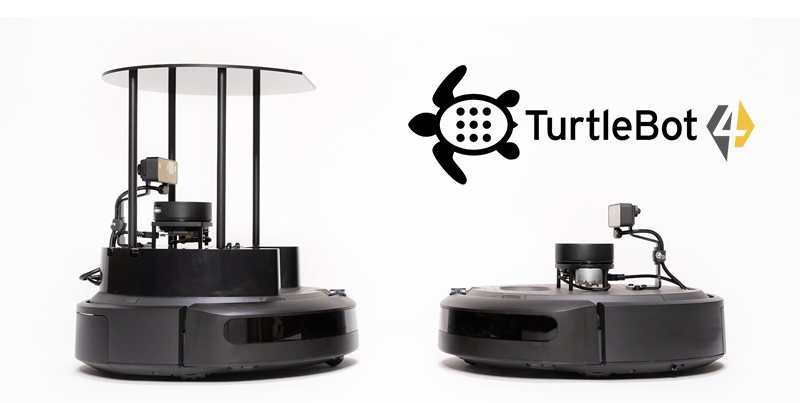
The starting price is £1,655 for the Lite version and £2,429 for the Standard which led to immediate disqualification from my search. But if that wasn’t enough, it has another major problem.
While Clearpath Robotics did lead the TurtleBot branding side, the base platform is actually an iRobot Create 3. With iRobot going bankrupt in December 2025, the Create 3 is no longer available. Clearpath asserts that they have enough stock to last until mid-2026 but it was a hard investment to justify given the uncertainty on what comes next.
TurtleBot 3
From there the next obvious place to look is the older TurtleBot 3. This previous generation of TurtleBots is made by Robotis and it comes in two varieties, a burger and a waffle with the burger being the entry level.
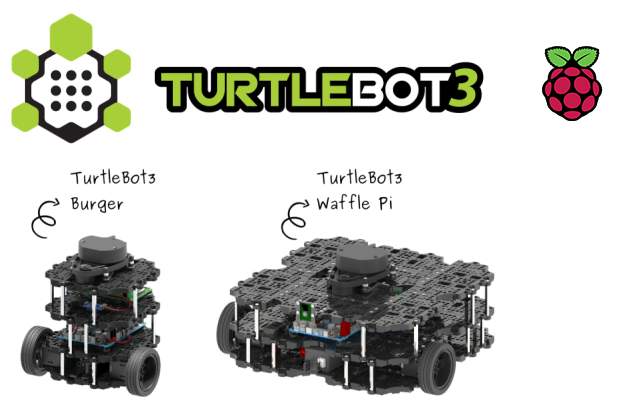
The burger starts at £655 which while much better than the TurtleBot 4 still stretched my requirements. I did however try to run it in simulation and while I did get it working I found that it kept getting lost. As this is the previous generation, its software stack was originally targeting ROS1. While it has been ported to ROS2, it feels like it never had the parameters tweaked to be correct for the platform. Additionally all of the manuals and instructions point to ROS2 Humble which is now 3 LTS releases ago. The hardware itself was also showing its age with it having been updated to the Raspberry Pi 4 in 2021 as the last hardware revision.
Between the cost, the dated hardware, and the misbehaving software stack, I decided it wasn’t good enough. Not to be unfair to the TurtleBot 3 however, it is the best existing option I looked at.
LeKiwi
Taking a different tack, there has been a lot of movement in non-ROS orbiting platforms. With Physical AI becoming a hot topic, there are many hobbyist level platforms springing up. Generally relying on small part numbers and 3D printed chassis these offer much better affordability.
LeKiwi is a collaboration between SIGRobotics and HuggingFace which aims to add a mobile platform base to another HuggingFace project, the SO-101 robotic arm. The chassis is fully 3D printed (following the OpenRoboticPlatform design guidelines) and it uses the same servos as the arm simplifying the combined bill of materials.
While the project has a breakdown of components, there is a kit available from Seeed Studio that comes out at about $320 pre-tax (roughly £290 total). Much more affordable.
The catch? It only has a single camera as a sensor which means it can’t run a typical ROS navigation stack which generally requires a LIDAR. More of a peeve for me rather than an issue, but the three wheeled holonomic system also adds unnecessary complexity for my use case.
Enter Mote
With the background out of the way, what is Mote?
Mote is a new open platform in the same vein as LeKiwi but with the explicit goal of supporting both ROS and Physical AI development simultaneously.
- I kept the ORP compatible 3D printed chassis, explicit bill of materials, and added a LIDAR sensor.
- It has a circular footprint and differential drive making it easy to use with ROS.
- It is cheap enough that a small fleet is feasible on a hobbyist budget (and a large one on a bigger budget!).
Many open-source and budget platforms stop at the hobby or research stage where repeatable bring-up, deployment, observability, and fleet management, the “full stack of robotics”, is often missing. I want Mote to be a place where I can explore and document that gap.
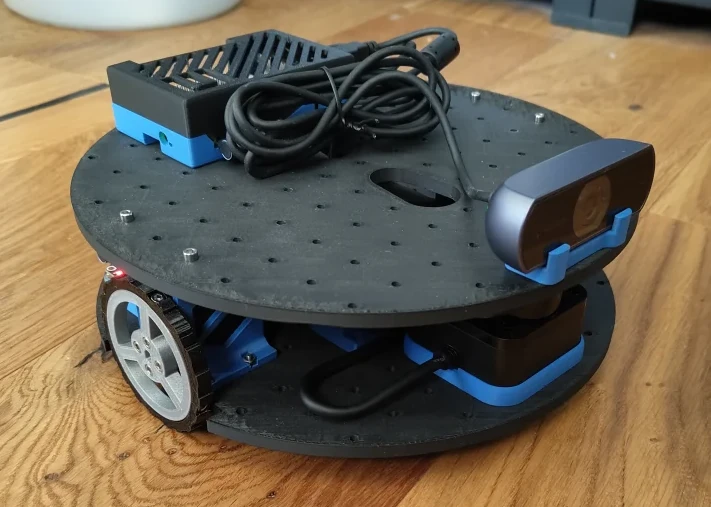
When I started out in robotics there was a $50 robot project I followed and made it seem possible I could own a real robot. That was made for a different age but the goal of making robotics accessible is still as vital today as it was then.
Hardware
The main hardware components are below with the Raspberry Pi and the battery being the biggest cost factors (see the BOM for the full hardware list).
- Raspberry Pi 5 (4GB) - Linux so it can run ROS 2, 4GB because memory is crazy expensive these days
- 5V USB-C power bank (slim form factor, ≥85W dual output) - Easy, cheap, and simple to integrate power supply
- 2× Feetech STS3215 servo - this simplifies the logic and standardises on components used by the SO-101 arm
- Waveshare Serial Bus Servo Driver Board - Needed to connect servos to the pi. If using the SO-101 arm they can share a single board.
- SLAMTEC RPLIDAR C1 - The cheapest LIDAR I could find.
- USB webcam - Need some vision for LeRobot to function. Also helps with teleoperation.
Total cost excluding printing is roughly £290 which is in line with the LeKiwi but comes with that extra LIDAR sensor. This is well within budget and that’s also before any price optimisations.
Software
pixi
I’ve long had a love-hate relationship with ROS especially around the build and packaging system. I started trying to install ROS using the normal installation instructions but got quickly frustrated finding some packages weren’t available on some releases.
Looking around for answers, I saw this post about the benefits of pixi and I thought I would give it a go.
I will save the details for another post, the main thing pixi gives is an independent environment based entirely on dependencies you define. This way of working takes a lot from other package managers like Rust’s excellent cargo and applies it to the C++/Python/conda space. That means we can limit what we install to exactly what we use without polluting the global system.
Installing and running the code for the robot is as simple as pixi run launch.
ROS2
I landed on ROS2 Jazzy not for any particular reason other than it seemed to have most of the packages I needed available on RoboStack (another excellent project). It was the most recent LTS at the time.
I mostly vibed the ROS2 setup attempting to get the standard stack (ros2_control, slam_toolbox, nav2) running, generating maps using SLAM and navigating around my flat.
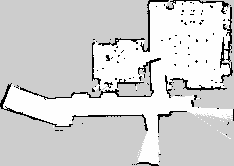
The next step here is to optimise the configs and libraries to make the platform solid. After that I want to look at where the Physical AI layer might sit in the platform (navigation seems solved but maybe either mapping or semantic layers? Human interfaces?).
Build and get started
As it currently stands, Mote is still in pre-release territory. While it does mostly work, some of the hardware choices I haven’t had as much time to optimise as I would like and I expect more changes soon (the battery is the main one). I pushed this early to get feedback and so that we can work together to get this platform into the best state we can before a version 1 release.
With that out of the way, and if you still want to try it out, the BOM document lists what you need to buy (mostly from Alibaba/AliExpress and Amazon). I’ve tried to keep the descriptions to the main requirements to help find alternatives in your area. If you’ve built a LeKiwi or an SO-101 arm, several parts will already look familiar.
At a high level the path is:
- Print the chassis plates.
- Assemble the mechanical stack and wire the Pi, servo board, LIDAR, and camera.
- Flash a Pi 5 with 64-bit Linux — Raspberry Pi OS Lite is an easy choice but most Linux RPi systems should work.
- Clone the Mote repo, run
pixi run buildand some one-time setup scripts for devices and ids. - Launch and start mapping.
The repo README has a step by step walk through.
If you want the full mobile manipulator picture, the chassis follows the Open Robotic Platform grid and mounts an SO-101 follower arm on a shared servo driver board.
What’s next
This post is deliberately the introduction: why Mote exists and what’s on the bench.
My next priority is trying to get the hardware locked down. Most of the components won’t change, but I might still tweak the layout to make better use of the space. There is an outstanding issue where the battery with cables is ever so slightly too big for the chassis.
Once that is locked down, I want to create a fully documented set of build instructions.
Looking at the software, I need to decide on a proper “deploy” workflow. My current rsync and git workflows aren’t ideal. I also want to tweak the configs to make this as reliable as possible given the hardware. It should be plug-n-play!
Longer term, I want to look at integration with LeRobot and get some learning going. Comparing learned policies to the classical stack should be interesting.
Finally, but somewhat interlaced with the above, I want to expand to a small fleet. This would allow testing more useful features and forces a production mindset to any processes I develop.
Wrapping up
Mote is my attempt at creating an affordable and accessible robotics platform that anyone should be able to use to either learn about robotics or attempt to break through the cutting edge. At £290 of hardware it’s cheap for a fully functioning platform.
Everything is open on GitHub: github.com/ClachDev/Mote. Design notes and the full BOM live under design/. The project is still early; issues, PRs, and “I tried this on hardware” reports are very welcome. If you build one, I’d love to hear what you use it for!