The Mote Software Stack, Part 1: Hardware to Navigation
tl;dr Robotics software is built in layers, and the reason is reaction time: the further down the stack you go, the faster a layer must react and the less it can deliberate. This post walks up the four layers currently running on Mote — hardware, embedded, base, and navigation — looking at what each one does, what it guarantees to the layer above, and how big its time budget is. Later parts will climb into tasks, fleets, and operations as Mote grows into them.
More than “hardware and software”
Why layers at all?
Before diving in, it’s worth asking why robotics software ends up layered. Most web systems get by as a flat collection of peers, and that microservice style serves them well. Why not robots?
Consider navigation. The job is to find a path from where the robot is to where it should be, producing a series of waypoints: A→B→C→D. But what happens when something interrupts the plan? A door closes, a person strolls across the route. Simple — make a new plan! Except: how long does that take? What if the environment changes again before you finish? Do you stop the robot while you replan, stalling it in a busy corridor? Or keep moving and risk hitting something — or someone?
The standard answer is to split the problem. A global planner thinks about the whole route and is allowed to be slow. A local planner only worries about the next few metres and must be fast. When a person steps in front of the robot, the local planner reacts in tens of milliseconds while the global planner calmly replans the route in the background.
This trade-off — the size of the task versus the time you have to act — is the fundamental tension in robotics software, and it’s the reason the stack is layered. Each layer takes on a small, well-defined job with a reaction time it can actually meet, and it guarantees that to the layer above. Higher layers can then afford to be slower and smarter, because they know the layers below are keeping the robot safe in the meantime.
The stack at a glance
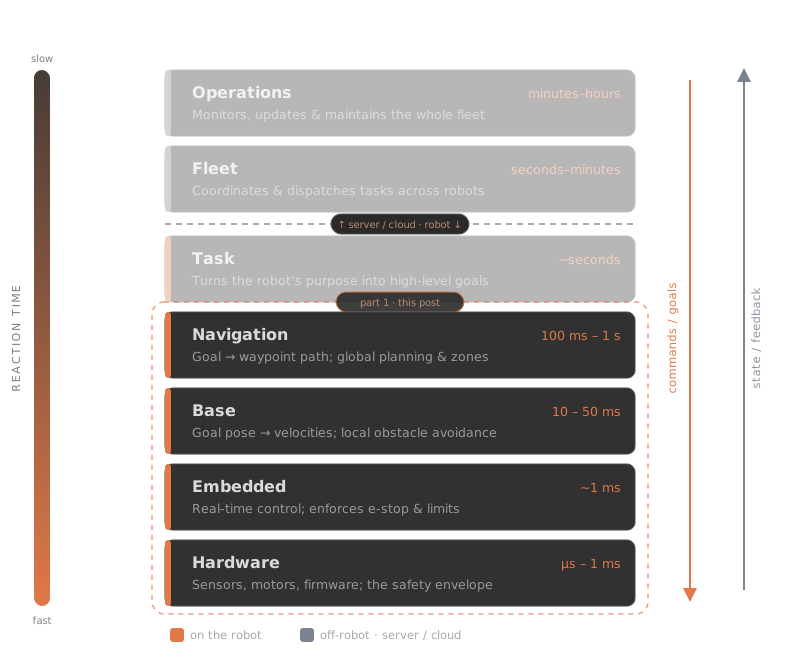
Two interfaces connect every pair of layers: commands flow down, state flows back up. And each layer can be read the same way, so that’s how I’ll structure this walk. For every layer, four questions:
- What does it do? What comes in, what goes out.
- What does it guarantee upward? The contract the next layer can rely on.
- What are the interfaces? The concrete messages, buses, or APIs.
- What’s the time budget? How fast it must react, and why.
Mote currently runs the bottom four layers for real (a task layer is sprouting — that’s part 2), so that’s the scope of this post. The numbers below aren’t hypothetical: they’re from the configs in the Mote repo as it runs today.
Hardware
Guarantees upward: the physical world, tamed into buses and packets — wheels that turn when commanded, a lidar that streams scans, all without destroying themselves.
The line between “hardware” and “software” is blurrier than it looks: almost every piece of modern robot hardware has software inside it. On Mote, the hardware layer is a Raspberry Pi 5, two Feetech STS3215 servos hanging off a 1 Mbaud serial bus, a SLAMTEC RPLIDAR C1 spinning at 10 Hz, and a USB webcam.
Each of those is its own tiny embedded system. The servos run firmware that closes a control loop around position and velocity internally — I don’t command motor currents, I command a speed and the servo’s firmware makes it happen, at rates far faster than anything upstream. The lidar likewise manages its own motor and streams measurements without being asked twice.
On a production robot this layer also carries serious safety machinery: safety-rated lidars with configurable protective envelopes that can cut motor power without any software involved, e-stop chains, torque limiters. It’s worth being honest about Mote here: it has none of that. The e-stop is pulling the battery lead. What makes this acceptable is physics — a sub-2 kg robot with a measured top wheel speed of 0.218 m/s carries very little kinetic energy. That number, incidentally, is measured from recorded odometry rather than taken from a datasheet, because the servos at 5 V don’t deliver anything like their rated speed. The gap between datasheet and reality is a running theme at this layer.
Time budget: microseconds to milliseconds, inside firmware I didn’t write and can’t see.
Embedded
Guarantees upward: “give me wheel velocities in rad/s and I’ll make the wheels do exactly that — and tell you what they actually did.”
On most robots this layer is a dedicated microcontroller running a real-time OS: it reads encoders, drives motors, and enforces the safety envelope on a guaranteed clock. Mote cheats. Because the servos already close their control loops in firmware, the embedded layer collapses into a single C++ plugin: MoteHardware, a ros2_control SystemInterface that translates between ROS’s world (radians, rad/s) and the servo bus’s world (12-bit encoder counts, speed units).
Small as it is, this layer earns its keep with the unglamorous corrections that make the maths above it come out right: tracking position cumulatively across the encoder’s 12-bit rollover, negating the left wheel because it’s mounted mirrored, converting rad/s to servo speed units through an empirically calibrated scale factor (674.1, measured with a calibration tool, not derived — there’s that theme again).
The honest gap here: this “embedded” layer runs on Linux, inside the same ros2_control loop as everything else, at 50 Hz. Linux is not a real-time OS. The 20 ms budget is met in practice but guaranteed by nothing — a production embedded layer’s whole reason for existing is that its timing is guaranteed. This is one of the more interesting trade-offs of a £290 robot, and physics is again the reason it’s tolerable.
Time budget: 20 ms per cycle (50 Hz), best-effort.
Base
Guarantees upward: “give me a pose a few metres away and I’ll move the robot towards it without exceeding its limits or hitting anything it can see.”
This is the layer that turns intent into motion, and on Mote it’s really two co-operating parts.
The first is diff_drive_controller, running in the 50 Hz ros2_control loop. It takes a body velocity command — “0.2 m/s forward, turning at 0.5 rad/s” — and converts it into individual wheel speeds, while enforcing the robot’s limits: 0.3 m/s linear, 1.87 rad/s angular, with acceleration caps. Whatever chaos happens above, nothing faster than those numbers reaches the wheels. It also produces wheel odometry, though on Mote the odometry that everything actually trusts comes from kinematic_icp, a lidar odometry package that corrects the wheel estimate against the world.
The second part is Nav2’s controller server — the local planner from the story at the top of this post. Running at 20 Hz against a local costmap that refreshes at 5 Hz from lidar, it looks a short distance ahead along the path, scores candidate trajectories, and picks velocities that follow the path while steering around whatever the lidar sees right now. This is the layer that reacts when someone steps in front of the robot. One Mote-specific detail: a custom critic feeds the measured 0.218 m/s wheel-speed ceiling into trajectory scoring, so the planner never asks for motion the drivetrain can’t deliver — commanded and actual behaviour stay honest with each other.
Time budget: 50 ms reaction (20 Hz), with hard velocity limits enforced at 50 Hz.
Navigation
Guarantees upward: “give me a goal anywhere on the map and I’ll produce — and maintain — a route to it that avoids everything we know about.”
The top layer of this post, and the slowest, most deliberative one: Nav2’s planner server, working against a global costmap built from the saved map plus live sensor data. Where the base layer thinks in metres and milliseconds, navigation thinks in the whole flat and in seconds. The global costmap updates at a leisurely 1 Hz — perfectly adequate, because reacting fast isn’t its job. Reacting fast is the base layer’s job; replanning well is navigation’s. If the route becomes blocked, this layer computes a new one while the base layer keeps the robot safe.
Navigation is also where the robot stops being a thing that moves and starts being a thing that knows where it is. Localisation (AMCL against a saved map when navigating; slam_toolbox when mapping) anchors the robot to the map frame. On Mote, maps and their coordinates live in a small “sites” system — a site groups the floors of one location, each floor holds immutable map revisions, and named zones (“kitchen”, “dock”) are taught by driving the robot there rather than by editing YAML. That structure exists because of a constraint worth calling out: zone coordinates only mean anything in the map frame they were taught in, so extending a map must never mean remaking it.
Time budget: seconds. Planning on demand, costmap at 1 Hz, replanning when the world disagrees with the plan.
The pattern so far
Walking up four layers, the trade from the top of the post shows up as a strict gradient — each layer slower, smarter, and safer-for-the-layer-above than the one beneath it:
| Layer | On Mote | Reacts in | Guarantee upward |
|---|---|---|---|
| Navigation | Nav2 planner, AMCL/slam_toolbox, sites | seconds | a maintained route on the map |
| Base | Nav2 controller + diff_drive_controller | 50 ms | motion within limits, avoiding the seen |
| Embedded | MoteHardware (ros2_control plugin) | 20 ms | wheels do what’s commanded, reported back |
| Hardware | servo & lidar firmware | µs–ms | physics, tamed into packets |
Each layer only gets to be as slow as it is because the one below is fast. Nav2 can ponder a route for a second because the local planner is watching the lidar at 20 Hz; the local planner can score trajectories because the velocity limits are enforced at 50 Hz; and everything rests on control loops inside the servo firmware. Layering isn’t bureaucracy — it’s how a robot gets to be both thoughtful and quick.
What’s next
Mote’s stack doesn’t stop here — it just gets thinner. A task layer is already sprouting: a behaviour-tree server that turns “fetch” into a sequence of navigation goals. That’s part 2. Above that sit the fleet and operations layers, which Mote will grow into as the fleet does — forcing exactly the production mindset that was the point of building a fleet in the first place.
Everything in this post is running code: github.com/ClachDev/Mote.